CRATE Solver Example
A fitting example is included to demonstrate how to use piglot with the clustering-based reduced-order model CRATE solver.
A 2D plane-strain infinitesimal strains simulation of a 2-phase heterogeneous material characterized by randomly distributed circular particles (volume fraction = 30%) embedded in a matrix (volume fraction = 70%), is subjected to a uniaxial tension macro-scale strain monotonic loading path prescribed in 50 load increments, and given by \(\boldsymbol{\varepsilon}_{xx}=0.02\).
The matrix material phase constitutive behavior is governed by the von Mises isotropic elasto-plastic constitutive model with isotropic hardening, whereas the particle’s material phase is governed by the isotropic linear elastic constitutive model.
A grid of \(100\times 100\) voxels (provided in the examples/crate_solver_fitting/Disk_50_0.3_100_100.rgmsh.npy file) is considered for discretisation, with 8 clusters attributed to the matrix phase and 2 to the particles:

We want to find the values for the Young’s modulus and the Poisson coefficient of both phases.
The notation Young_1 and poisson_1 is respective to the properties of the matrix, and Young_2 and poisson_2 of the particles.
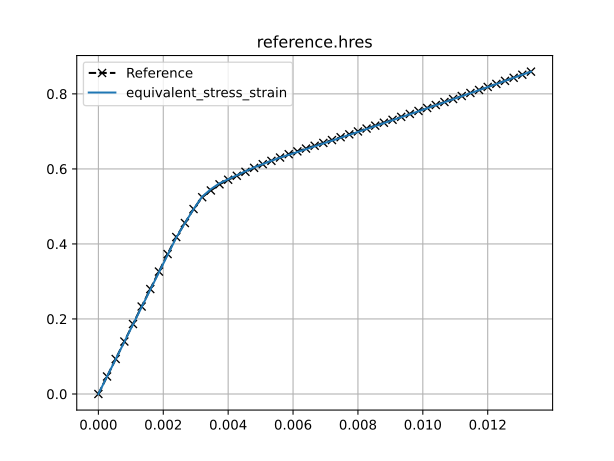
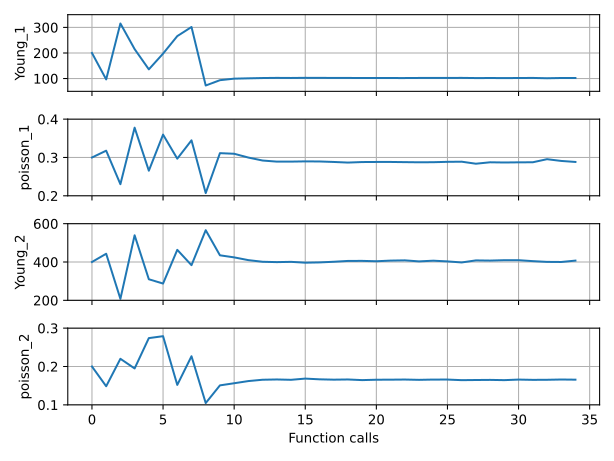
The reference equivalent stress-strain response is computed using the following values for these parameters: Young_1: 100, poisson_1: 0.3, Young_2: 500 and poisson_2: 0.19.
The reference response is provided in the examples/crate_solver_fitting/reference.hres file.
We run 25 iterations using the botorch optimiser within the composite setting.
The configuration file (examples/crate_solver_fitting/config.yaml) for this example is:
iters: 25

optimiser: botorch

parameters:
  Young_1:   [200,   50,  350]
  poisson_1: [0.3,  0.2,  0.4]
  Young_2:   [400,  200,  600]
  poisson_2: [0.2,  0.1,  0.3]

objective:
  name: fitting
  composite: True
  solver:
    name: crate
    # path to the CRATE executable
    crate: CRATE/src/cratepy/main.py
    cases:
      'predicted.dat':
        fields:
          'equivalent_stress_strain':
            name: hresFile
            y_field: vm_stress
            x_field: vm_strain
  references:
    'reference.hres':
      prediction: ['equivalent_stress_strain']
      x_col: 25
      y_col: 26
      skip_header: 1
      filter_tol: 1e-6
      show: False
The field crate must indicate the path to the CRATE executable.
The input data file for running CRATE is given in examples/crate_solver_fitting/predicted.dat, where the notation <Young_1>, <poisson_1>, <Young_2> and <poisson_2> indicates the parameters to optimise.
For each function call, and before running the solver, these template parameters are substituted by their appropriate values in the CRATE input data file.
The column 25 and 26, corresponding to the equivalent strain and equivalent stress, of the reference file are used for comparison, and the header of the reference file is ignored by setting skip_header: 1. The number of points in the reference response is also filtered using the response reduction algorithm with a threshold of filter_tol: 1e-6.
To run this example, open a terminal inside the piglot repository, enter the examples/crate_solver_fitting directory and run piglot with the given configuration file
cd examples/crate_solver_fitting
piglot config.yaml
You should see an output similar to
Filtering reference reference.hres ... done (from 51 to 10 points, error = 4.50e-07)
BoTorch: 100%|█████████████████████████████████████████| 25/25 [02:15<00:00,  5.43s/it, Loss: 6.0299e-06]
Completed 25 iterations in 2m15s
Best loss:  6.02994207e-06
Best parameters
-   Young_1:   102.005847
- poisson_1:     0.288350
-   Young_2:   407.237665
- poisson_2:     0.165656
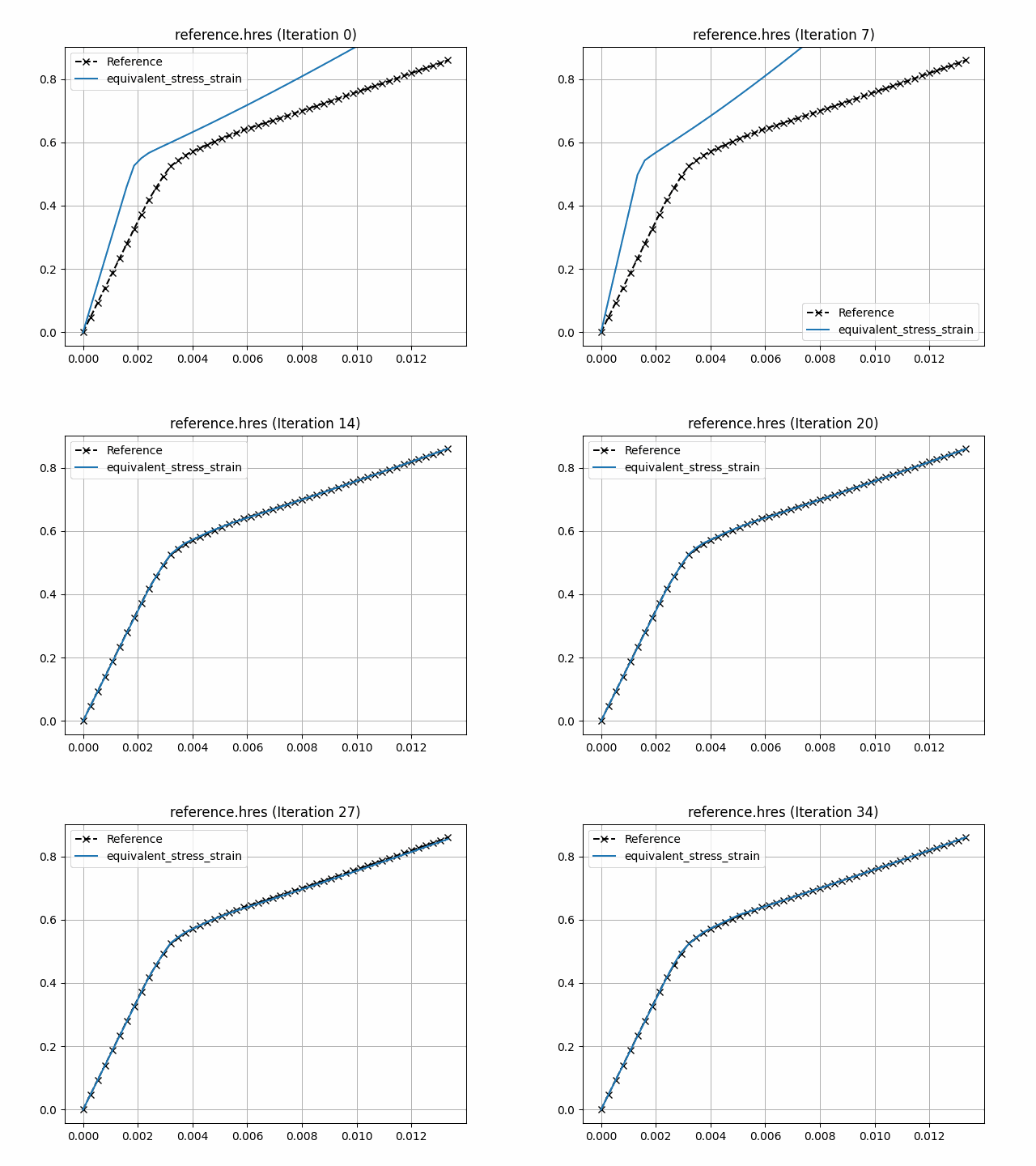
The number of points in the reference response was filtered from 51 to 10 points. Note that despite the fact that the optimal parameters are not exactly the same as the ones used to compute the reference response, the loss function value is very small, and the fitting is excellent as can be seen in the figures below.
To visualise the optimisation results, use the piglot-plot utility.
In the same directory, run (this may take some time)
piglot-plot animation config.yaml
This generates an animation for all the function evaluations that have been made throughout the optimisation procedure for the two target objectives.
You can find the .gif file(s) inside the output directory, which should give something like (for the minimum_value target):
Now, try running
piglot-plot parameters config.yaml
This will plot the evaluated parameters during the optimisation procedure:
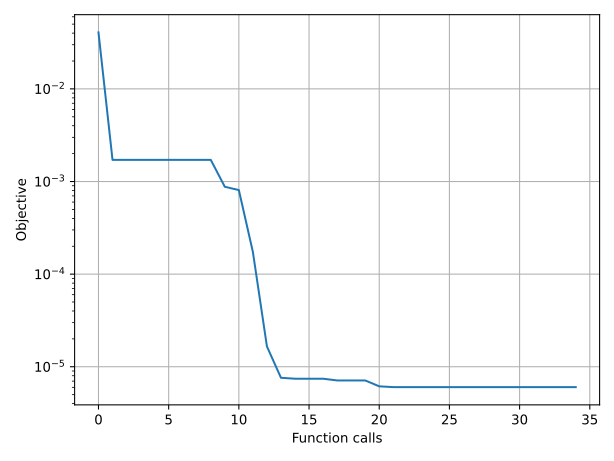
To see the convergence history of the best loss function value, run
piglot-plot history config.yaml --best --log
which will generate:
To see the best-observed value for the optimisation problem, run
piglot-plot best config.yaml
which will generate: